
MediaPilot AI: The WordPress Media Library Plugin
MediaPilot AI: The WordPress Media Library Plugin
If you have ever scrolled endlessly through the WordPress media library hunting for one image, re-uploaded a file you already had, or wondered which posts actually use that 4 MB hero banner from 2022 — you already know the native media library was never built to scale. It stores files. It does not help you manage them.
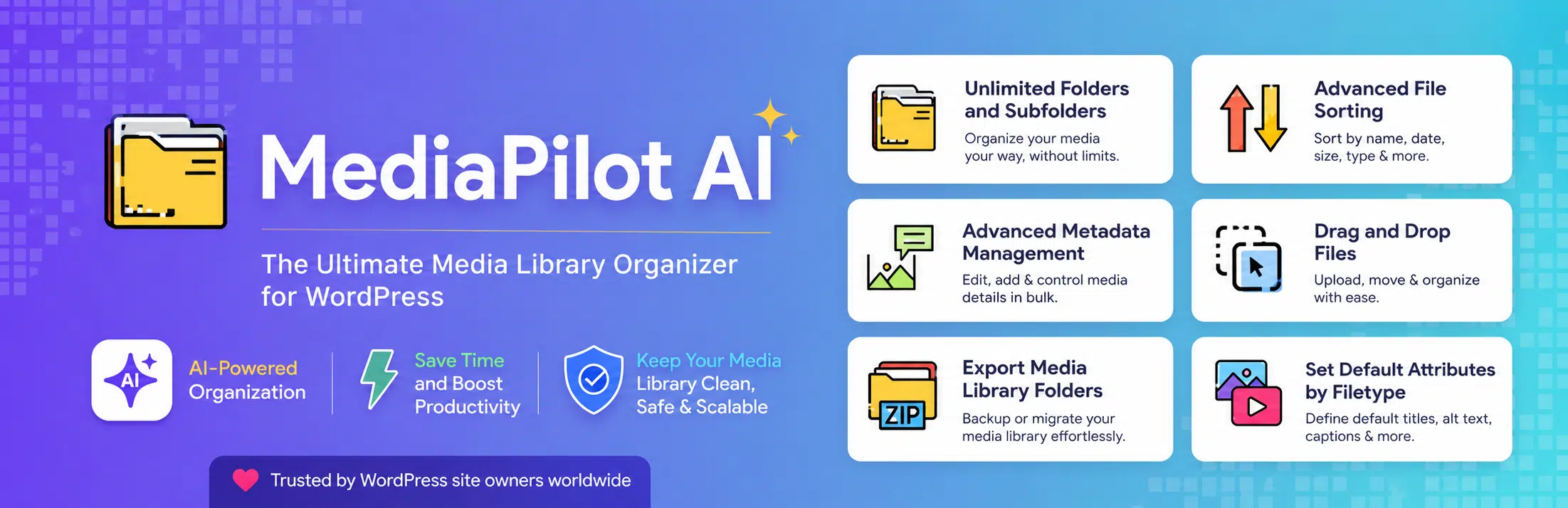
That gap is exactly what MediaPilot AI is built to close. It's a new WordPress media library plugin from BrainStudioz that turns the standard media library into a full Digital Asset Management (DAM) platform — complete with folders, AI tagging, OCR, duplicate detection, usage tracking, analytics, and WooCommerce integration. And it does all of this without replacing or breaking the media library you already use.
Here's a full breakdown of what it does and who it's for.
The problem with the default WordPress media library
Out of the box, WordPress dumps every upload into one flat, ever-growing pile. There are no folders. There's no way to see where a file is used. There's no duplicate detection, no search beyond the filename, and no real insight into how much storage each file type is eating. For a personal blog, that's tolerable. For an agency, an eCommerce store, or any content team managing thousands of assets, it becomes a daily tax on time.
MediaPilot AI enhances the native library rather than replacing it — so every standard WordPress media feature keeps working exactly as before, with a powerful management layer added on top.
Key features of MediaPilot AI
Hierarchical folders with drag-and-drop
The headline feature is a proper folder system for your media. You get nested, hierarchical folders with drag-and-drop organization, bulk assignment, and the choice between per-user folders or a global structure shared across your team. Migrating from another media-folder plugin? MediaPilot AI offers one-click import of existing folders and file assignments, so you don't start from scratch.
AI tagging and OCR
This is where the "AI" in MediaPilot AI earns its name. The plugin can auto-tag your images on upload using Google Cloud Vision or AWS Rekognition, generating descriptive metadata so your library becomes genuinely searchable. It also supports OCR text extraction via Google Vision or AWS Textract — meaning text baked into images (scanned documents, infographics, screenshots) becomes findable through search.
Both features are strictly opt-in. They're disabled by default and only activate once you choose a provider and enter your own API credentials. Nothing leaves your site unless you explicitly switch them on.
Duplicate detection
Bloated media libraries are full of duplicates. MediaPilot AI finds them two ways: exact duplicates matched by file hash (MD5), and visually similar images matched by perceptual hashing — so it catches near-identical files even when the filenames differ. The scan runs in the background in small batches, shows live progress, and can be cancelled at any time.
Usage tracking and cleanup
One of the most genuinely useful tools here is the usage tracker. It shows you exactly which posts, pages, WooCommerce products, page-builder widgets, and modules use each media file. Flip it around and you get an "Unused Media" view that flags files referenced nowhere — making library cleanup safe and deliberate instead of a guessing game.
Analytics dashboard
MediaPilot AI gives you real visibility into your media: total storage, storage broken down by file type and by folder, upload activity over time, and insert/download counts per attachment. Everything is exportable to CSV for reporting.
Version control and safe replacement
Need to swap out a file? The plugin keeps a full version history of replaced files, so you can roll back to an earlier version with a single click — no more breaking a dozen pages because you replaced the wrong asset.
Built for teams, agencies, and eCommerce
Beyond core management, MediaPilot AI ships features aimed squarely at professional workflows:
- Client Portal — password-protected share links for delivering assets to external clients
- Document Library — a public, searchable file library you can embed anywhere via shortcode
- WooCommerce integration — product gallery sync for stores managing large catalogs
- CDN URL rewriting — optionally serve your media from your own CDN for faster load times (opt-in)
- Gallery blocks — a native block-editor block plus widgets for the major page builders
- CSV import/export — migrate folder structures and file assignments in bulk
- WP-CLI support — manage folders, export data, and run optimization from the command line
- Developer hooks — extensive
do_actionandapply_filtershooks for custom extensions
It's also multilingual-ready and compatible with the major translation plugins.
Privacy-first by design
This is worth emphasizing because it's rare. By default, MediaPilot AI contacts no external service and no data leaves your site. AI tagging, OCR, and CDN rewriting are all opt-in, and each one is clearly disclosed: which provider receives the data, what's sent, and where. The Client Portal logs downloads (file, timestamp, IP) only in your own site's database for audit purposes — never to a third party. Even Chart.js, used for the analytics dashboard, is bundled locally so the plugin pulls nothing from outside CDNs.
For agencies handling client data and stores subject to privacy regulations, that default-private posture matters.
Who should use MediaPilot AI?
MediaPilot AI is built for:
- Agencies juggling assets across many client sites
- eCommerce stores managing large WooCommerce product image catalogs
- Marketers and content teams who need to find, reuse, and audit media fast
- Anyone whose media library has quietly grown into an unmanageable mess
Getting started
Installation is the standard WordPress flow:
- Install and activate MediaPilot AI from the plugin page.
- Go to Media › MediaPilot AI Settings to configure folders, analytics, and optional integrations.
- If you want AI tagging or OCR, choose a provider and add your own API credentials.
- Run Rebuild Usage Index once from Media › Analytics so the usage tracker and "Unused Media" view populate fully.
MediaPilot AI requires WordPress 6.4 or higher and PHP 8.1+.
Final thoughts
Most WordPress sites treat the media library as a junk drawer — fine until the day you can't find anything in it. MediaPilot AI reframes that drawer as a managed, searchable, AI-assisted asset system, and it does so without sacrificing privacy or breaking native functionality. For any team that lives in their media library, it's a serious upgrade.
Download MediaPilot AI from the WordPress plugin directory and give your media library the management layer it's been missing.